WPCodeBox 2 v1.4.1 Plugin
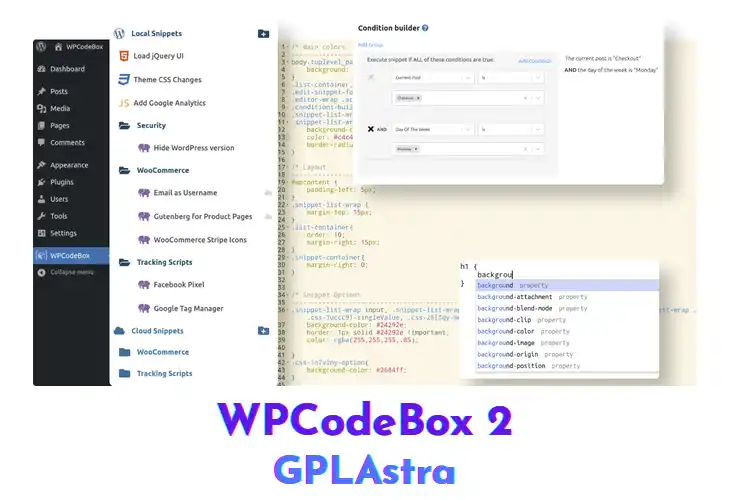
WPCodeBox lets developers store, edit, and run code snippets directly inside the WordPress admin. It supports PHP, JavaScript, CSS, as well as SCSS and LESS, automatically compiling the latter into clean CSS. The built‑in editor offers WordPress‑aware autocomplete, so you can reference functions, hooks, and template tags without leaving the screen. Whether you’re building a theme, tweaking a plugin, or testing a one‑off fix, the plugin keeps everything organized in one place.
After installing, you’ll find a new Snippets menu where each entry can be saved as an inline block or linked to an external file. Choose the language tab, type your code, and the editor instantly highlights syntax errors and suggests WordPress functions. Enabling the SCSS/LESS toggle compiles the stylesheet on save, eliminating a separate build step. The lightweight interface loads quickly, and snippets can be activated site‑wide or on specific post types. Give it a try and see how smooth snippet management feels.
Core Features of WPCodeBox 2 Plugin
- Snippet Library Management: Store, edit, and categorize code blocks in a searchable library, keeping your custom logic tidy and accessible.
- Inline and External Files: Add snippets directly in the editor or reference external JavaScript or CSS files, giving you flexibility for small tweaks or large assets.
- SCSS & LESS Compilation: Write SCSS or LESS and let the plugin compile it to standard CSS on save, removing the need for external build tools.
- WordPress‑Aware Autocomplete: Autocomplete suggestions include WordPress functions, hooks, and template tags, speeding up development and reducing typo errors.
- Language Specific Syntax Highlighting: Each language tab highlights syntax accurately, so PHP, CSS, SCSS, JavaScript, and HTML are easy to read at a glance.
- Conditional Snippet Activation: Activate snippets only on the front‑end, admin area, or specific templates, preventing unnecessary code execution.
- One‑Click Snippet Execution: Run a snippet instantly from the toolbar to test changes without publishing the entire page.
- Import/Export Snippet Packs: Export a collection of snippets as a JSON file and import it on another site, simplifying migration or team sharing.
- Lightweight Admin Interface: The UI loads in seconds and stays responsive even with dozens of snippets, preserving admin performance.
- License‑Based Cloud Sync: Sync your library to the cloud when a valid license key is present, ensuring your snippets are backed up across installations.
- No Database Nulling Required: The core plugin works out of the box without any database nulling, so you can start coding immediately.
- Post‑Type Targeting: Target individual post types or taxonomies, allowing fine‑grained control over where custom code runs.
- Real‑Time Error Detection: Errors are flagged as you type, letting you correct issues before the snippet is saved or executed.
What’s New (Changelog) in WPCodeBox 2 v1.4.1
= 1.4.1 (Released on Sep 22nd 2026) =
* Fix: Generated MCP configurations now use a stable server name based on each site's URL, including subsites and different ports. Setup prompts preserve other sites' connections and check for existing names before adding a server.
* Fix: MCP setup prompts now include the selected client's configuration and explain how to set up Claude Desktop when the assistant cannot access local files. Added JSON merge instructions and local credential guidance instead of promising automatic setup.
* Improvement: PHP snippets set to "Manual (On Demand)" now show a small play badge on their icon in the editor sidebar and Snippet Manager.
* Fix: Editing a snippet from the Snippet Manager now opens the requested snippet instead of restoring the previous selection, including when local and cloud lists finish loading in either order.
* Fix: Restored the public PHP API's execution-by-ID behavior for integrations such as WP All Import. `Api::runSnippet()` can again execute Function Editor snippets set to "Do not run", so import helper functions are available without changing existing snippets. The editor Run endpoint and MCP run tool continue to require "Manual (On Demand)" snippets.
* Fix: Local folder drag-and-drop order now saves when the drag ends, including drops onto titles or icons. Cloud folder IDs are excluded from local saves, the editor keeps its folder state synchronized, and failed saves show an error and reload the saved order.
* Fix: Fixed the Safe Mode link on the fatal-error screen.
* Fix: External-token execution now respects safe mode. Newly generated Functionality Plugins also use the improved recovery URL handling.
* Fix: Fatal errors in callbacks registered by snippets can now be attributed after the initial snippet execution has finished, so the responsible snippet is disabled on shutdown. Unrelated failures are not attributed to the last snippet that ran, and direct snippet errors retain their editor line numbers.
* Fix: MCP `wpcodebox_list_snippets` now includes every snippet in its flat `snippets` array, including snippets inside folders. The folder index remains available, and snippet `folderId` values are returned as integers.
* Fix: MCP calls now preserve actionable errors for missing snippets, permissions, invalid hooks and conditions, invalid folder names, and snippets that cannot be run on demand. Unexpected internal exception details remain hidden.
Similar Plugins