AI Engine Pro v3.8.8 WP Plugin
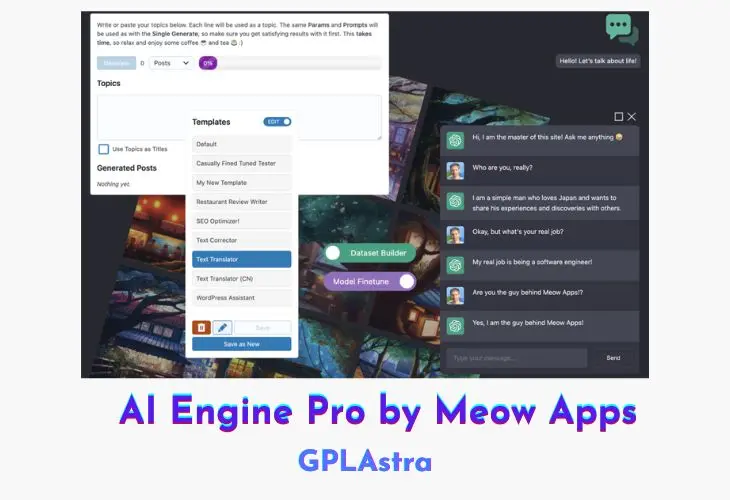
AI Engine Pro is a powerful WordPress plugin that can help take your website to the next level with its AI capabilities. With features like content generation, a ChatGPT-style chatbot, and an AI Playground with tools for translation, correction, and discussions, you can engage your visitors in new and exciting ways. The plugin is also highly customizable and includes tools for fine-tuning AI models, creating datasets, and tracking usage.
Whether you’re looking to improve your website’s content, customer support, or overall performance, AI Engine Pro can help you achieve your goals with ease. Best of all, the free version of the plugin includes many of these great features, so you can try it out and see the magic for yourself.
Core Features of AI Engine Pro WP Plugin
- Content Generation: With AI Engine Pro, you can easily generate fresh and engaging content for your website. This can save you time and effort while also providing your visitors with valuable information.
- Amazing Chatbot: The plugin also includes a ChatGPT-style chatbot that you can add to your website. This chatbot is customizable and can help you provide customer support, answer common questions, and engage your audience.
- AI Playground: The AI Playground is a collection of tools that allow you to try out a variety of tasks, such as translation and correction, in a fun and interactive way. You can also engage in ChatGPT-style discussions, further enhancing your website’s capabilities.
- Customizable: AI Engine Pro is highly customizable, allowing you to modify and adapt its features to suit your needs. This makes it a versatile tool that can be used for a wide range of purposes.
- Easy Fine-tuning: The plugin also includes tools for creating datasets and fine-tuning AI models. This can help you improve the accuracy of your AI-generated content and enhance your website’s overall performance.
- Statistics, Limitations, Forms and More!: You can use AI Engine Pro to sell an AI service to your users, based on your expertise. The plugin also includes features for tracking AI usage, setting limits, and managing forms.
What’s New (Changelog) in AI Engine Pro v3.8.8
= v3.8.8 (2026/10/27) =
* Fix: Security: Shop Managers can no longer edit administrator accounts through MCP, and the plugin and theme file tools now follow DISALLOW_FILE_EDIT.
* Fix: Security: Forms and the Public API can no longer read protected uploads, the Google voice chatbot no longer exposes its API key, voice chats cannot replace someone else's conversation, and only admins can read the logs.
* Fix: Security: Guests can no longer reset their usage limits with a fake IP header, while proxies and Cloudflare are still recognized.
* Fix: Security: Chatbot replies now drop embedded frames and forms, and guest uploads are capped at 20 per hour.
* Add: MCP tab showing the week's activity, recent changes with links to each WordPress diff, connections, access and tools.
* Add: Settings backups with a restore in Maintenance, and settings now save only what changed.
* Add: Chatbots panel in Workspace to chat with the site's own chatbots, using their instructions, model and Knowledge.
* Add: Gemini 4 models such as gemini-4-argon now get vision, PDF, web search, Google Maps and thinking, as features follow the version number.
* Add: Keepalives for streams that stay silent from the start, so nginx no longer cuts them at 120 seconds.
* Add: The header shows the installed version and, when a newer one is out, how to update or renew.
* Update: The MCP connect card guides you through Claude's directory first, confirms when your assistant reaches the site, points ChatGPT users to the official AI Engine app with Developer mode as the direct option, says the connector stores no password and none of your content, and offers an optional, unticked Meow Apps news signup.
* Update: MCP stays off on updated sites that never stored the setting, only new installs get it on by default.
* Update: The MCP Connection Test warns when the host strips the Authorization header and gives the .htaccess line, and AI Engine reads that header from Apache when WordPress cannot see it.
* Update: The MCP post list accepts several post types or statuses at once, returns everything when asked for all posts, understands an author given by name, and the post count and post list tools return clearer data.
* Update: In the Knowledge tab, creating an environment moved into the environment dropdown and Create New became Add Manually.
* Update: New Meow Apps dashboard, from the latest shared common code.
* Update: The admin now works on tablets, with the header, columns and Chatbots toolbar no longer breaking.
* Update: The header lights the button of the screen you are on.
* Update: Various labels and links, including the Dashboard footer now pointing to the Getting started guide and the Discussions setting pointing to the Discussions tab.
* Fix: Chatbots keep web search, MCP servers and their reasoning settings after calling a function, which also stops Claude's "Invalid signature in thinking block" error.
* Fix: Chatbots keep their Knowledge context after calling a function on every provider, including Google, OpenRouter and other compatible providers.
* Fix: Syncing a large OpenAI Vector Store no longer times out, each step stops after about 25 seconds and the next one continues from there.
* Fix: The chatbot preview in the Chatbots tab shows the conversations held before 3.8.7 again instead of starting empty.
* Fix: Content Studio no longer shows each section heading twice when the model repeats it.
* Fix: MCP tools now accept text request ids as the JSON-RPC spec allows.
* Fix: Re-setting a featured image through MCP no longer fails, terms can be removed, and featured image errors say why.
* Fix: Admin scripts refresh when only the UI library changes instead of staying cached.
Similar Plugins