Divi Mega Menu Pro v3.7.0 WP Plugin
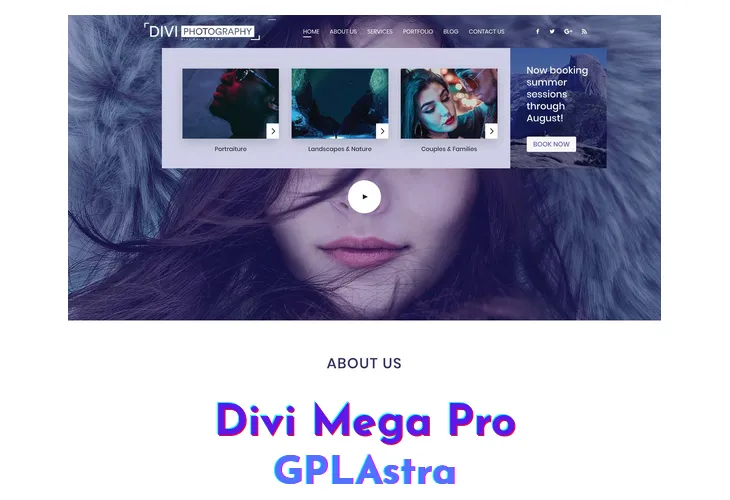
Divi Mega Pro enables web designers to create full-featured mega menus and interactive tooltips using the visual Divi Builder. Rather than struggling with rigid menu plugins or limited styling options, Divi Mega Pro allows designers to construct mega menu content using any Divi module, including contact forms, video players, WooCommerce products, and pricing tables.
The plugin supports trigger options such as hover activation, click toggles, and manual class selectors, alongside exit animations and custom positioning rules. Designers can build full-width dropdown menus that stretch across the entire viewport or constrain them to specific parent navigation elements, ensuring clean responsive presentation across desktop and mobile screens.
Core Features of Divi Mega Menu Pro WP Plugin
- Divi Builder Menu Creation: Design mega menu dropdowns using native Divi modules, columns, and layout presets.
- Full-Width and Custom Width Menus: Stretch dropdown panels to 100% viewport width or constrain them to navigation boundaries.
- Hover and Click Trigger Actions: Open mega menus when visitors hover over navigation links or click menu buttons.
- Interactive Mega Tooltips: Attach informative hover tooltips to any page element, icon, or button on the site.
- WooCommerce Product Showcase: Embed live WooCommerce product grids and add-to-cart buttons inside navigation menus.
- Custom Entrance and Exit Animations: Choose fade, slide, and zoom transitions with custom animation duration.
- Mobile Responsive Fallback: Provide touch-friendly mobile navigation drawers adapted for small screen devices.
- Zero Coding Required: Build complex multi-column navigational headers visually without writing custom CSS.
What’s New (Changelog) in Divi Mega Menu Pro v3.7.0
VERSION 3.7.0 – 02/04/26
- NEW – Added Ajax Loaded mega menu method in settings, with preloader options and control over when menus load after the page.
- MOD – Mega Menu library posts now use the same “only queryable when editing or previewing” rules as Divi Library layouts, keeping Divi 5.1 Visual Builder behaviour in sync with Divi.
- FIX – Visual Builder no longer gets stuck loading when editing mega menus on Divi 5.1 and recent WordPress (script loading order in the builder frame).
- FIX – Mega Menu editing now keeps the clean builder canvas (without theme header/sidebar/comments) while preserving Divi 5.1 compatibility improvements.
- FIX – Default mega menus now pick up Divi 5 module and preset styles on Theme Builder and other layouts (footer output runs after Divi’s style pass and uses the correct style buffer).
- FIX – Fixed “Change tops position on scroll” not returning to the “Adjust From Top” value when scrolling back to the top of the page.
- FIX – Fixed Mega Menu editor loading issues introduced with Divi 5.1.0
- FIX – Buttons inside the mega menu now retain their custom styles (e.g. background and text color) on the frontend.
- FIX – Button hover styles (e.g. background color on hover) now apply correctly in the mega menu dropdown.
- FIX – When button icon is set to Off in the Button module, the default icon no longer appears on hover inside the mega menu dropdown.
- FIX – Plugin update checks now register correctly so new versions show up under Plugins when available.
Similar Plugins